
 Plugin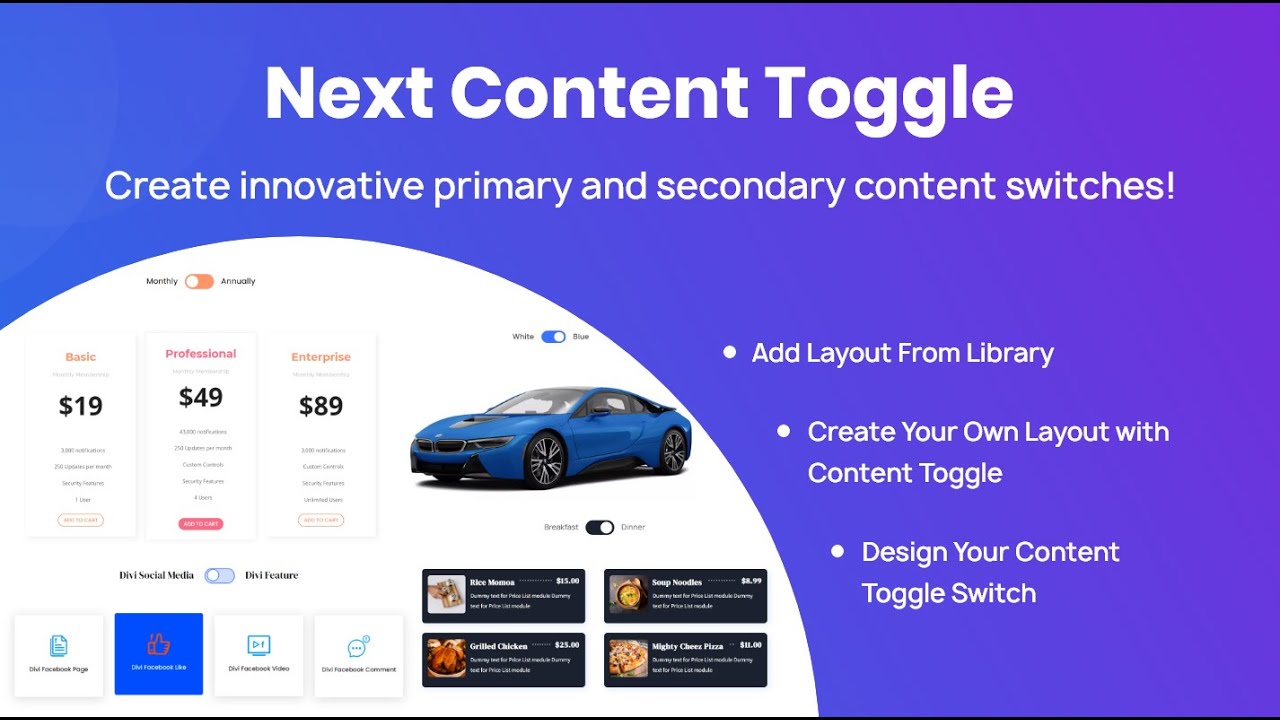
PluginUpdated
Next Content Toggle
Next Content Toggle is a WordPress plugin for Divi Next users who want to present content in switchable sections.
Product facts
- Version
- 1.0
- Released
- 5 November 2025
- Type
- Plugin
- Licence
- GPL
- Included in
- Every plan, or $3.99 on its own
Overview
Next Content Toggle lets you place multiple content sections behind toggle controls, so visitors can switch between blocks instead of seeing every section at once. This can help organize related information within a page and give visitors a direct way to move between content segments.
Use the plugin with Divi Next layouts to add toggle areas to your site. You can style toggle buttons, choose animation effects, and manage several toggle groups on one page, with each group operating independently. The interface is designed for creating toggles without writing code.
Features
- Switch between sections: Let visitors move between multiple content sections or blocks using toggle controls within your page layout.
- Style toggle controls: Choose from toggle button designs and animation effects to align the controls with your site's visual style.
- Separate toggle groups: Add multiple toggle areas to a single page and manage each group independently for flexible content layouts.
- Responsive toggling: Toggle controls and content are designed to work across devices, including smartphones and tablets.
- Create without code: Use the plugin's interface to build content toggles without coding, making it suitable for site owners and developers.
Best for
- Divi Next site owners
- Web designers organizing page content
- Developers building interactive layouts
FAQ
Is Next Content Toggle free?
The code of Next Content Toggle is licensed under the GPL, so anyone may use, change and share it. GPL 247 is a paid service: a plan or a purchase of Next Content Toggle gives you the download and its updates. The developer's own support, licence key and online services are not included.
Which version of Next Content Toggle is this?
Version 1.0, released 5 November 2025. New versions appear here when the developer publishes them.
How do I update Next Content Toggle?
Install GPL 247 Updater on your site and paste your key from My Account. It installs new versions of Next Content Toggle for you.
You might also like
Plugin Plugin
 Plugin
 Plugin
 Plugin
 Plugin
 Plugin
 Plugin