
 Plugin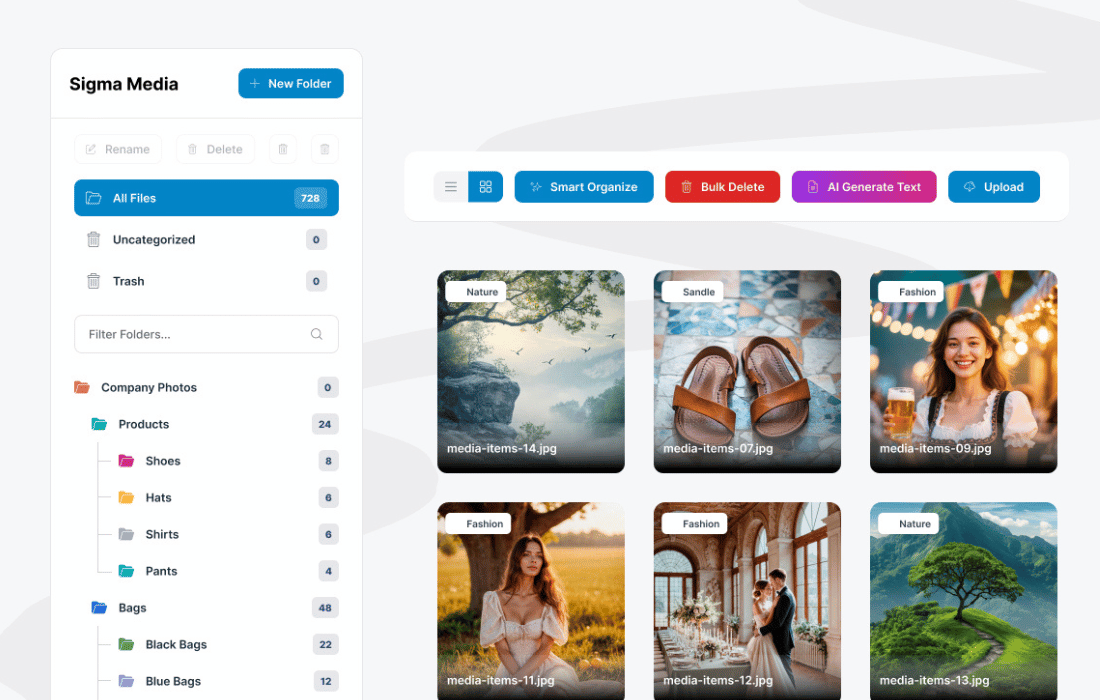
PluginUpdated
Sigma Media Manager
Sigma Media Manager is a WordPress plugin by bdthemes for organizing a site's media library.
Product facts
- Version
- 1.8.0
- Released
- 28 October 2026
- Type
- Plugin
- Licence
- GPL
- Included in
- Every plan, or $5.59 / year on its own
Overview
As a WordPress media library grows, finding a particular image, video, or file can take time. Sigma Media Manager adds filtering by file type, upload date, and custom tags, helping site owners locate items within their library. Category tags provide another way to group media for different projects and make it easier to retrieve later.
The plugin also supports bulk edits, deletions, and categorization, so you can manage several media items in one action. For library cleanup, it can help identify unused or duplicate files for removal. Its interface is designed for media management across desktop, tablet, and mobile, making it useful for site owners and developers who regularly work with WordPress media.
Features
- Filter media items: Narrow the media library by file type, upload date, or custom tags to find images, videos, and files.
- Add category tags: Assign custom category tags to media items, creating groups that help organize assets for different projects.
- Manage items in bulk: Edit, delete, or categorize multiple media files at once instead of handling each item individually.
- Find unused files: Identify unused or duplicate media files in the library, then remove items you no longer need.
- Use a clear interface: Work with media through an interface designed to keep library navigation clear and organized.
- Manage media across devices: Access media library management from desktop, tablet, or mobile devices with a responsive design.
Best for
- WordPress site owners with growing media libraries
- Developers organizing client site media
- Content teams managing images, videos, and files
Changelog
Version 1.8.0 — 25 October 2026
- Security Document Library: protected files no longer expose their direct URL, and folder passwords now cover subfolders.
- Security Visitors can no longer bypass a library's allowed file types.
- Security SVGs uploaded through the REST API are sanitized; folder names show as plain text in notifications.
- Security Only administrators can run or dismiss folder imports.
- Fixed Deleting a file no longer deletes other images' WebP/AVIF files.
- Improved Image optimization keeps originals: AVIF is saved alongside, PNGs no longer grow, and re-optimizing keeps the backup.
- Fixed Media modal and sidebar: no duplicate folders, correct counts, and Escape no longer deletes an existing "New Folder".
- Improved Smart Organize shows folder names and counts each file once.
- Fixed Attachment details keep the saved alt text, and Replace/Edit stay after Optimize or Restore.
- Fixed "Clear filters" clears the search box too.
- Fixed Claude AI works again, and Gemini no longer returns empty text.
- Fixed Document Library: correct Word/Excel/PowerPoint filters, subfolder search, and "Load more" for large folders.
- Fixed Cloud: deleting media also removes its thumbnails from storage.
- Fixed Settings: Save buttons can't be double-clicked, and the background scan toggle stays off after saving.
Earlier versions
- 1.7.4 (16 September 2026): 2 fixed
- 1.7.2 (22 August 2026): 1 improved, 5 security
- 1.7.1 (10 August 2026): 1 removed
FAQ
Is Sigma Media Manager free?
The code of Sigma Media Manager is licensed under the GPL, so anyone may use, change and share it. GPL 247 is a paid service: a plan or a purchase of Sigma Media Manager gives you the download and its updates. The developer's own support, licence key and online services are not included.
Which version of Sigma Media Manager is this?
Version 1.8.0, released 28 October 2026. New versions appear here when the developer publishes them.
How do I update Sigma Media Manager?
Install GPL 247 Updater on your site and paste your key from My Account. It installs new versions of Sigma Media Manager for you.
More from bdthemes
Plugin Plugin
 Plugin
 Plugin
 Plugin
 Plugin
 Plugin
 Plugin