
 Plugin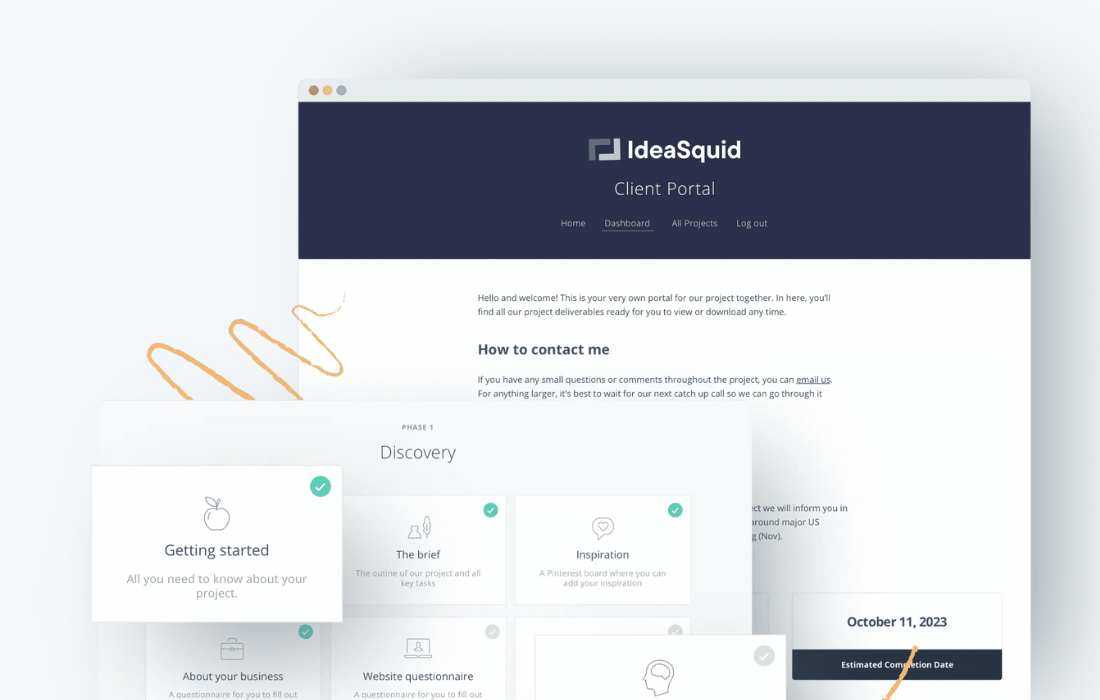
PluginUpdated
Client Portal
Client Portal is a WordPress plugin by Laura Elizabeth for freelancers, agencies, and small businesses that manage client projects.
Product facts
- Version
- 5.10.0
- Released
- 5 October 2026
- Type
- Plugin
- Licence
- GPL
- Included in
- Every plan, or $10.99 / year on its own
Overview
Scattered project files and updates can make it harder for clients to keep track of work. Client Portal brings project information into a private dashboard on your WordPress site, where clients can view project status, access deliverables, and download files. Freelancers, agencies, and small businesses can use it to give each client a dedicated place to follow their project and find shared materials.
Create a portal from scratch, use a saved template, or choose a ready-made option from the Portal Gallery. You can customize the portal to fit your branding, and clients can receive emails when files are added or when you choose to notify them about an updated content page. File modules can display a title in place of the uploaded filename.
Features
- Private client dashboards: Give clients a dedicated dashboard where they can check project information, updates, deliverables, and files in one place.
- Portal templates: Start a portal from scratch, use one of your templates, or select a ready-made portal from the Portal Gallery.
- File sharing: Add files to Files or Private Files modules for clients to access, and set a display title instead of showing the uploaded filename.
- Client email notifications: Email clients when you add files to a portal module, or choose which clients to notify after updating a content page.
- Brand customization: Adjust the portal's look to match your brand, so the client area fits the appearance of your WordPress site.
- Portal and template export: Export a portal or template as a JSON file and import it through the portal chooser, including its content pages, navigation, and files.
Best for
- Freelancers managing client projects
- Agencies sharing project deliverables
- Small businesses serving clients
Changelog
Version 5.10.0 — 28 September 2026
- New Creating a portal now opens a chooser. Start from scratch, use one of your own templates, or pick a ready-made portal from the Portal Gallery.
- New You can favourite a template so it sorts first under My Templates.
- New You can export a portal or template as JSON from the list screen, and import that file from the chooser. Content pages, synced patterns, navigation, and files come with the export.
- New Files and Private Files can show clients a title instead of the uploaded filename. The title starts as the name in the Media Library, and you can change it on the module.
- New Clients can now be emailed when you add files to a Files or Private Files module in their portal. The email waits a few minutes after you last save so you can add more files without extra messages. This is on by default. You can turn it off or change the wording in Notifications, the same way as the other emails.
- New After you update a content page, you can email the clients who can see that page. Updating the page does not send the email. You choose who to notify from the confirmation that appears after you save. Turn this off in Notifications to hide the link.
- New Each module can use its own icon. PNG, JPG, GIF, and WebP work by default. SVG is available when your site already allows SVG uploads.
- New Portal text now follows your site language, including comments, module actions, and Client Uploads. Belgian Dutch is included.
- Improved Editing a template shows a notice that existing portals stay unchanged.
- Improved Synced patterns in the editor link out to their documentation.
- Improved The template gallery heading stays on screen while templates load.
- Improved The Powered by link opens in a new tab.
- Improved Text under an image slider in the popup no longer sits against the bottom edge.
- Fixed Client Uploads no longer show on public portals, and the editor warns you when one is set up there.
- Fixed Imported templates no longer arrive already favourited.
- Fixed Deleting a WordPress user removes that person from the portals they were assigned to.
- Fixed On sites with many content pages, the assigned page stays selected in the editor dropdown.
- Fixed The Register block lists portals and templates beyond the first 10.
- Fixed A content page no longer goes blank when an image slider is missing images.
- Fixed Importing a portal no longer stalls when images on the source site cannot be reached.
- Fixed Moving a portal to another site keeps links between its content pages, and links that pointed at the original site, working.
- Fixed Imported content keeps backslashes.
- Fixed Module icons display correctly when several appear on the same page.
- Fixed The Portals column on the Users screen loads faster on sites with many portals.
Earlier versions
- 5.9.1 (14 August 2026): 1 improved, 4 fixed
- 5.8.0 (23 April 2026): 3 new, 8 improved, 5 fixed, 1 security
- 5.7.3 (7 April 2026): 1 fixed
FAQ
Is Client Portal free?
The code of Client Portal is licensed under the GPL, so anyone may use, change and share it. GPL 247 is a paid service: a plan or a purchase of Client Portal gives you the download and its updates. The developer's own support, licence key and online services are not included.
Which version of Client Portal is this?
Version 5.10.0, released 5 October 2026. New versions appear here when the developer publishes them.
How do I update Client Portal?
Install GPL 247 Updater on your site and paste your key from My Account. It installs new versions of Client Portal for you.
You might also like
Plugin Plugin
 Plugin
 Plugin
 Plugin
 Plugin
 Plugin
 Plugin